class: center, middle, inverse, title-slide # APIs ## IPSA-Flacso Summer School ### Tiago Ventura --- # Our plans for today 1. Introduction to APIs 2. Accessing APIs "manually". 3. Using R packages to access APIs. - Twitter API. --- # Introduction to APIs. The acronym API corresponds to the term “Application Programming Interface“. APIs are an online repository built, among other things, to facilitate the exchange of information between data users and the holders. In the end, you access this repository as you access any website, via URLs. The main difference is that the return is **not an html** and a web page, but **data** in a unestructured format. <br> - **Example from Twitter. What would Twitter be like without an API?** --- ## API Uses There are two main ways in which we academics commonly use APIs. 1. Access data shared by Companies and NGOs. (Twitter, Spotify, Yelp, NYT, Portal da Transparência, IPEA) 2. Process our data in Algorithms developed by third parties. (Perspective API) - Our focus will be on the first type of APIs. --- ## API usage for data access. In its simplest form, an API is just a url. See the example below: `http://mysite.com/key?param_1;param_2` Main elements: - **http://mysite.com/**: the base of the API, called "the end-point" in most of the documentation. - **key**: the credentials many sites ask for - not all, as we'll see. - **?param_1;param_2** parameters, or filters to refine the API search. To access the API we use the `httr` package. And to clean up the outputs, we'll use several of the `tidyverse` and `jsonlite` functions. --- # Simple use of APIs. Let's start with an API in which we don't need to ask for a password. We'll start with a very simple API called [DOG API](https://dog.ceo/dog-api/). #### Step One: Find Endpoints Open the website and read the documentation. Endpoints contain the type of information that the API makes available. #### Step Two: Look for Filters This API is pretty simple. It has no filters. #### Step Three: Access via Get. --- ### Example with GET ```r library(httr) library(tidyverse) # Acess the API endpoint = "https://dog.ceo/api/breeds/image/random" acesso = GET(endpoint) # examine the objects class(acesso) ``` ``` ## [1] "response" ``` --- ## Fourth Step: Access the output using content. ```r # see the element content(acesso) ``` ``` ## $message ## [1] "https://images.dog.ceo/breeds/ridgeback-rhodesian/n02087394_8903.jpg" ## ## $status ## [1] "success" ``` ```r # Access the content. link_image <- content(acesso)$message download.file(link_image, destfile = "cao.png") ``` --- <img src="cao.png" width="80%" /> --- # Crossfire API Let's now use the Crossfire project API as an example. In this case, the API requires credentials. This should always be our first step. [Here](https://api.fogocruzado.org.br/) you will find the description on how to gain your access password. ```r # Activating the packages library(httr) library(jsonlite) library(tidyverse) # asking for the password get_jwt <- httr::POST("https://api.fogocruzado.org.br/api/v1/auth/login", query = list(email = "venturat@umd.edu", password = "xxxxxxxxxx")) # get the token #token <- httr::content(get_jwt)$access_token ``` --- ## API Endpoint 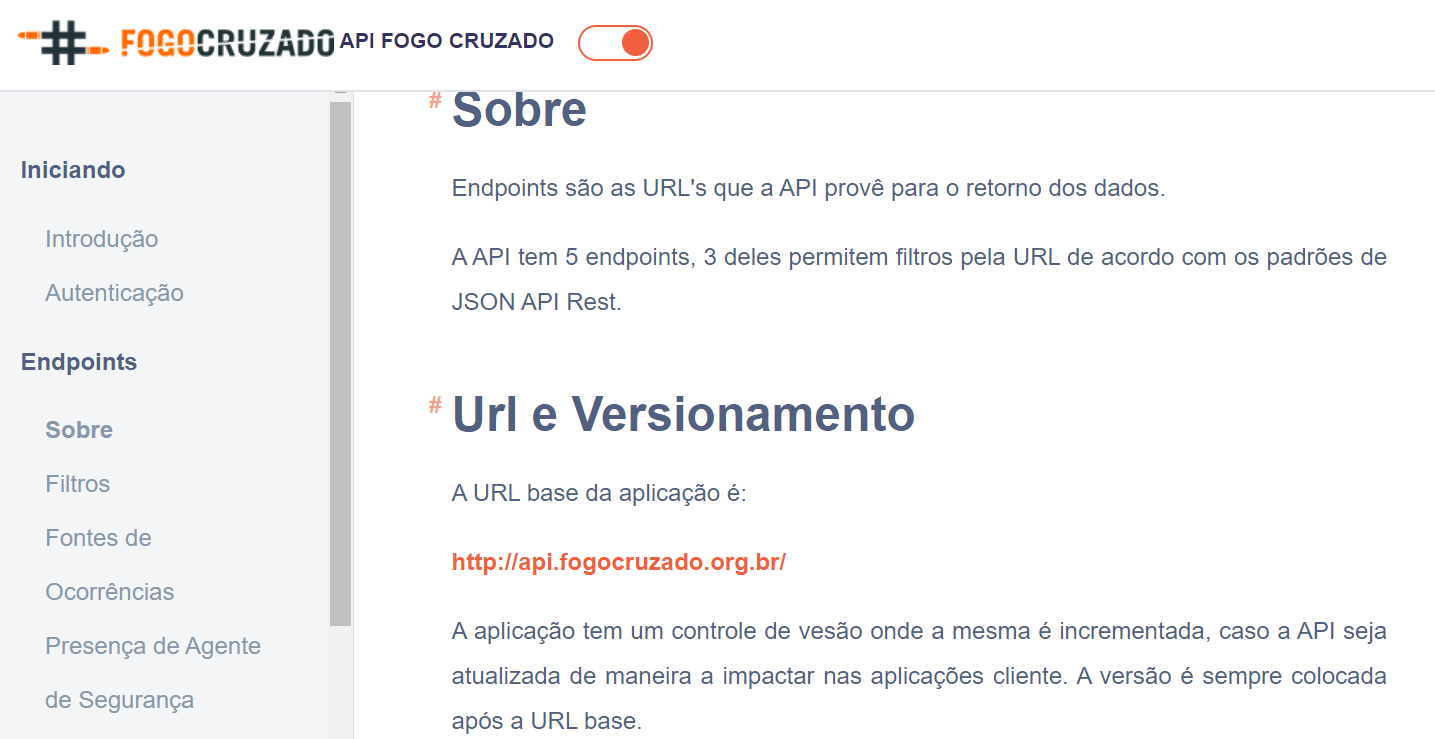 --- ## API Filters In the [documentation](https://api.fogocruzado.org.br/docs/1.0/occurrences), it is indicated that there are three main endpoints for the API: cities, states and occurrences. Let's start with the cities endpoint, an easy one that doesn't require filters. Open this [documentation] link (https://api.fogocruzado.org.br/docs/1.0/cities) ```r # Step 1: Create the URL base_url <- "https://api.fogocruzado.org.br/api/v1" cities <- "/cities" api <- paste0(base_url, cities) print(api) # somente um site ``` ``` ## [1] "https://api.fogocruzado.org.br/api/v1/cities" ``` --- ### GET Request To ask for the Api data ```r # Step 2: Acces the api response <- GET(api, add_headers('Authorization' = paste("Bearer", token, sep = " "))) # Result response ``` ``` ## Response [https://api.fogocruzado.org.br/api/v1/cities] ## Date: 2021-09-02 00:54 ## Status: 200 ## Content-Type: application/json ## Size: 6.89 kB ``` --- ## Cleaning the Results The API output is a JSON file - which is a more efficient type for saving large files - and has a status of 200 - which means your access worked. ```r # Convert to a json json_fogo_cruzado <- content(response, as="text", encoding = "UTF-8") ```  --- ## Cleaning Jsons ```r # Cleaning Jsons output <- fromJSON(json_fogo_cruzado) %>% tibble::as_tibble() output ``` ``` ## # A tibble: 36 x 9 ## CidadeId EstadoId Cidade CodigoIBGE Gentilico Populacao Area ## <int> <int> <chr> <int> <chr> <int> <int> ## 1 3253 17 Goiana 2606200 "goianense" 75644 44581 ## 2 3185 17 Abreu e Lima 2600054 "abreu-limen… 94429 12619 ## 3 3196 17 Araçoiaba 2601052 "araçoiabens… 18156 9638 ## 4 3215 17 Cabo de Santo Ago… 2602902 "cabense" 185025 44874 ## 5 3221 17 Camaragibe 2603454 "camaragiben… 144466 5126 ## 6 3259 17 Igarassu 2606804 "igarassuano… 102021 30556 ## 7 3261 17 Ilha de Itamaracá 2607604 "itamaracaen… 21884 6668 ## 8 3264 17 Ipojuca 2607208 "ipojuquense" 80637 52711 ## 9 3270 17 Itapissuma 2607752 "itapissumen… 23769 7424 ## 10 3272 17 Jaboatão dos Guar… 2607901 "jaboatãoens… 644620 25869 ## # … with 26 more rows, and 2 more variables: DensidadeDemografica <chr>, ## # PIBPrecoCorrente <lgl> ``` --- ## API with Filters. All real APIs have parameters to filter accesses. Filters are added as a filter query in the GET function. These filters must be ordered according to the API documentation. Let's see [here](https://api.fogocruzado.org.br/docs/1.0/occurrences) some examples --- ## Example of filters ```r # shootings base_url <- "https://api.fogocruzado.org.br/api/v1" occurences <- "/occurrences" api <- paste0(base_url, occurences) print(api) ``` ``` ## [1] "https://api.fogocruzado.org.br/api/v1/occurrences" ``` ```r # Build a Query query_list <- list(data_ocorrencia="2019-01-01", nome_cidade= "Rio de Janeiro") # GET response <- GET(api, query=query_list, add_headers('Authorization' = paste("Bearer", token, sep = " "))) output <- jsonlite::fromJSON(httr::content(response, as="text", encoding = "UTF-8")) %>% tibble::as_tibble() View(output) ``` --- ### Write an entire endpoint. ```r # url basica de ocorrencias. base_url <- "https://api.fogocruzado.org.br/api/v1" occurences <- "/occurrences" filter= "?data_ocorrencia[gt]=2019-01-01&data_ocorrencia[lt]=2019-05-01&CidadeID[]=3661" api <- paste0(base_url, occurences, filter) print(api) ``` ``` ## [1] "https://api.fogocruzado.org.br/api/v1/occurrences?data_ocorrencia[gt]=2019-01-01&data_ocorrencia[lt]=2019-05-01&CidadeID[]=3661" ``` ```r # GET response <- GET(api, add_headers('Authorization' = paste("Bearer", token, sep = " "))) output <- jsonlite::fromJSON(httr::content(response, as="text", encoding = "UTF-8")) %>% tibble::as_tibble() output ``` ``` ## # A tibble: 3,334 x 67 ## id_ocorrencia local_ocorrencia latitude_ocorren… longitude_ocorr… ## <int> <chr> <dbl> <dbl> ## 1 26653 Parque Sao Jose, Belford Ro… -22.7 -43.3 ## 2 24842 Malvinas, Vila Kennedy - Ba… -22.9 -43.5 ## 3 23155 R. Carbonita - Bráz De Pina… -22.8 -43.3 ## 4 23157 Pavão-Pavãozinho, Copacaban… -23.0 -43.2 ## 5 23158 R. Miguel Cervantes - Cacha… -22.9 -43.3 ## 6 23159 Senador Camará, Rio de Jane… -22.9 -43.5 ## 7 23162 R. Mario Behring - Vila Ros… -22.7 -43.3 ## 8 23163 R. Miguel Cervantes - Cacha… -22.9 -43.3 ## 9 23169 Copacabana - Copacabana, Ri… -23.0 -43.2 ## 10 23170 Mangueirinha, Periquitos, D… -22.8 -43.3 ## # … with 3,324 more rows, and 63 more variables: data_ocorrencia <chr>, ## # hora_ocorrencia <chr>, presen_agen_segur_ocorrencia <int>, ## # qtd_morto_civil_ocorrencia <int>, qtd_morto_agen_segur_ocorrencia <int>, ## # qtd_ferido_civil_ocorrencia <int>, qtd_ferido_agen_segur_ocorrencia <int>, ## # estado_id <int>, cidade_id <int>, nome_cidade <chr>, cod_ibge_cidade <int>, ## # gentilico_cidade <chr>, populacao_cidade <int>, area_cidade <int>, ## # densidade_demo_cidade <chr>, nome_estado <chr>, uf_estado <chr>, ## # cod_ibge_estado <int>, homem_qtd_mortos_oc <int>, ## # homem_qtd_feridos_oc <int>, mulher_qtd_mortos_oc <int>, ## # mulher_qtd_feridos_oc <int>, chacina_oc <int>, chacina_qtd_mortos_oc <int>, ## # chacina_unidades_policiais_oc <chr>, ag_seguranca_vitima_oc <int>, ## # ag_seguranca_mortos_status_oc <chr>, ag_seguranca_feridos_status_oc <chr>, ## # bala_perdida_oc <int>, bala_perdida_qtd_mortos_oc <int>, ## # bala_perdida_qtd_feridos_oc <int>, interior_residencia_oc <int>, ## # interior_residencia_qtd_mortos_oc <int>, ## # interior_residencia_qtd_feridos_oc <int>, imediacao_ensino_oc <int>, ## # imediacao_ensino_qtd_mortos_oc <int>, ## # imediacao_ensino_qtd_feridos_oc <int>, vitima_crianca_oc <int>, ## # vitima_crianca_qtd_mortos_oc <int>, info_adicional_crianca_morta_oc <chr>, ## # vitima_crianca_qtd_feridos_oc <int>, ## # info_adicional_crianca_ferida_oc <chr>, vitima_adolescente_oc <int>, ## # vitima_adolescente_qtd_mortos_oc <int>, ## # info_adicional_adolescente_morto_oc <chr>, ## # vitima_adolescente_qtd_feridos_oc <int>, ## # info_adicional_adolescente_ferido_oc <chr>, vitima_idoso_oc <int>, ## # vitima_idoso_qtd_mortos_oc <int>, info_adicional_idoso_morto_oc <chr>, ## # vitima_idoso_qtd_feridos_oc <int>, info_adicional_idoso_ferido_oc <chr>, ## # informacao_transporte_oc <int>, descricao_transporte_interrompido_oc <chr>, ## # data_interrupcao_transporte_oc <chr>, data_liberacao_transporte_oc <chr>, ## # informacao_via_oc <int>, descricao_via_interrompida_oc <chr>, ## # data_interrupcao_via_oc <chr>, data_liberacao_via_oc <chr>, ## # outros_recortes <chr>, motivo_principal <chr>, motivo_complementar <chr> ``` --- class: center, inverse, middle ## Have we chacked if there exists any package to do all this work for us? --- ## Crossfire This [link](https://github.com/voltdatalab/crossfire) contains the R package website, and recommendations on how to use it. The installation follows: ```r #Instalation install.packages("devtools") # pacote para acessar o github devtools::install_github("voltdatalab/crossfire") ``` ```r library(crossfire) # Tell you user fogocruzado_signin(email = "venturat@umd.edu", password = "xxxxxx") # Extract the data (same thing we did before) fogocruzado_rj <- get_fogocruzado(state= "RJ", security_agent = 1) ``` ``` ## Rows: 3,245 ## Columns: 67 ## $ id_ocorrencia <int> 22275, 19737, 16450, 19193, 16279… ## $ local_ocorrencia <chr> "Cidade Alta - Cordovil, Rio de J… ## $ latitude_ocorrencia <dbl> -22.81983, -22.98798, -22.88180, … ## $ longitude_ocorrencia <dbl> -43.29491, -43.24798, -43.26849, … ## $ data_ocorrencia <chr> "2018-12-05 06:29:00", "2018-09-2… ## $ hora_ocorrencia <chr> "6:29:00", "4:00:00", "16:58:00",… ## $ presen_agen_segur_ocorrencia <int> 1, 1, 1, 0, 0, 1, 1, 0, 0, 0, 0, … ## $ qtd_morto_civil_ocorrencia <int> 0, 0, 0, 0, 0, 0, 0, 0, 0, 0, 0, … ## $ qtd_morto_agen_segur_ocorrencia <int> 0, 0, 0, 0, 0, 0, 0, 0, 0, 0, 0, … ## $ qtd_ferido_civil_ocorrencia <int> 1, 0, 0, 0, 0, 0, 1, 0, 0, 0, 0, … ## $ qtd_ferido_agen_segur_ocorrencia <int> 0, 0, 2, 0, 0, 0, 0, 0, 0, 0, 0, … ## $ estado_id <int> 19, 19, 19, 19, 19, 19, 19, 19, 1… ## $ cidade_id <int> 3661, 3661, 3661, 3661, 3661, 366… ## $ nome_cidade <chr> "Rio de Janeiro", "Rio de Janeiro… ## $ cod_ibge_cidade <chr> "3304557", "3304557", "3304557", … ## $ gentilico_cidade <chr> "carioca", "carioca", "carioca", … ## $ populacao_cidade <int> 6320446, 6320446, 6320446, 632044… ## $ area_cidade <int> 119746, 119746, 119746, 119746, 1… ## $ densidade_demo_cidade <dbl> 5.27, 5.27, 5.27, 5.27, 5.27, 5.2… ## $ nome_estado <chr> "Rio de Janeiro", "Rio de Janeiro… ## $ uf_estado <chr> "RJ", "RJ", "RJ", "RJ", "RJ", "RJ… ## $ cod_ibge_estado <chr> "33", "33", "33", "33", "33", "33… ## $ homem_qtd_mortos_oc <int> 0, 0, NA, NA, NA, NA, NA, NA, NA,… ## $ homem_qtd_feridos_oc <int> 1, 0, 2, NA, NA, NA, 1, NA, NA, N… ## $ mulher_qtd_mortos_oc <int> 0, 0, NA, NA, NA, NA, NA, NA, NA,… ## $ mulher_qtd_feridos_oc <int> 0, 0, NA, NA, NA, NA, NA, NA, NA,… ## $ chacina_oc <int> NA, NA, NA, NA, NA, NA, NA, NA, N… ## $ chacina_qtd_mortos_oc <int> NA, NA, NA, NA, NA, NA, NA, NA, N… ## $ chacina_unidades_policiais_oc <chr> NA, NA, NA, NA, NA, NA, NA, NA, N… ## $ ag_seguranca_vitima_oc <int> NA, NA, 1, NA, NA, NA, NA, NA, NA… ## $ ag_seguranca_mortos_status_oc <chr> NA, NA, NA, NA, NA, NA, NA, NA, N… ## $ ag_seguranca_feridos_status_oc <chr> NA, NA, "Em serviço", NA, NA, NA,… ## $ bala_perdida_oc <int> NA, NA, NA, NA, NA, NA, NA, NA, N… ## $ bala_perdida_qtd_mortos_oc <int> NA, NA, NA, NA, NA, NA, NA, NA, N… ## $ bala_perdida_qtd_feridos_oc <int> NA, NA, NA, NA, NA, NA, NA, NA, N… ## $ interior_residencia_oc <int> NA, NA, NA, NA, NA, NA, NA, NA, N… ## $ interior_residencia_qtd_mortos_oc <int> NA, NA, NA, NA, NA, NA, NA, NA, N… ## $ interior_residencia_qtd_feridos_oc <int> NA, NA, NA, NA, NA, NA, NA, NA, N… ## $ imediacao_ensino_oc <int> NA, NA, NA, NA, NA, NA, NA, NA, N… ## $ imediacao_ensino_qtd_mortos_oc <int> NA, NA, NA, NA, NA, NA, NA, NA, N… ## $ imediacao_ensino_qtd_feridos_oc <int> NA, NA, NA, NA, NA, NA, NA, NA, N… ## $ vitima_crianca_oc <int> NA, NA, NA, NA, NA, NA, NA, NA, N… ## $ vitima_crianca_qtd_mortos_oc <int> NA, NA, NA, NA, NA, NA, NA, NA, N… ## $ info_adicional_crianca_morta_oc <chr> NA, NA, NA, NA, NA, NA, NA, NA, N… ## $ vitima_crianca_qtd_feridos_oc <int> NA, NA, NA, NA, NA, NA, NA, NA, N… ## $ info_adicional_crianca_ferida_oc <chr> NA, NA, NA, NA, NA, NA, NA, NA, N… ## $ vitima_adolescente_oc <int> NA, NA, NA, NA, NA, NA, NA, NA, N… ## $ vitima_adolescente_qtd_mortos_oc <int> NA, NA, NA, NA, NA, NA, NA, NA, N… ## $ info_adicional_adolescente_morto_oc <chr> NA, NA, NA, NA, NA, NA, NA, NA, N… ## $ vitima_adolescente_qtd_feridos_oc <int> NA, NA, NA, NA, NA, NA, NA, NA, N… ## $ info_adicional_adolescente_ferido_oc <chr> NA, NA, NA, NA, NA, NA, NA, NA, N… ## $ vitima_idoso_oc <int> NA, NA, NA, NA, NA, NA, NA, NA, N… ## $ vitima_idoso_qtd_mortos_oc <int> NA, NA, NA, NA, NA, NA, NA, NA, N… ## $ info_adicional_idoso_morto_oc <chr> NA, NA, NA, NA, NA, NA, NA, NA, N… ## $ vitima_idoso_qtd_feridos_oc <int> NA, NA, NA, NA, NA, NA, NA, NA, N… ## $ info_adicional_idoso_ferido_oc <chr> NA, NA, NA, NA, NA, NA, NA, NA, N… ## $ informacao_transporte_oc <int> NA, NA, 1, NA, NA, NA, NA, NA, NA… ## $ descricao_transporte_interrompido_oc <chr> NA, NA, "Supervia-", NA, NA, NA, … ## $ data_interrupcao_transporte_oc <chr> NA, NA, NA, NA, NA, NA, NA, NA, N… ## $ data_liberacao_transporte_oc <chr> NA, NA, NA, NA, NA, NA, NA, NA, N… ## $ informacao_via_oc <int> NA, NA, NA, NA, NA, NA, NA, NA, N… ## $ descricao_via_interrompida_oc <chr> NA, NA, NA, NA, NA, NA, NA, NA, N… ## $ data_interrupcao_via_oc <chr> NA, NA, NA, NA, NA, NA, NA, NA, N… ## $ data_liberacao_via_oc <chr> NA, NA, NA, NA, NA, NA, NA, NA, N… ## $ outros_recortes <chr> NA, NA, NA, NA, NA, NA, NA, NA, N… ## $ motivo_principal <chr> "Ação policial", "Operação Polici… ## $ motivo_complementar <chr> NA, NA, NA, NA, NA, NA, NA, NA, N… ```