class: center, middle, inverse, title-slide # Scrapping Digital Data ## IPSA-Flacso Summer School ### Tiago Ventura --- # Today's Plan: We will start our journey on how to collect data on/using the internet. - Theoretical Notions of Data Scraping - Basic html - `rvest` for scraping websites. - APIs (second part of the class) --- ## Introduction. There are two main ways to access data on the internet: 1. Scraping data on websites 2. Accessing APIs (Application Programming Interface). <br><br> **Accessing data via APIs is safer, more convenient, and faster. Scraping data is harder, and more challenging. Therefore, always choose the APIs, if those exist.** --- ## What is data scraping? Data scraping consists of building a script to automatically collect data available on-line. You can alsways do this by hand. However, at scale, this is very likely an impossible task. Then, we need computers to help us out. Examples of websites I've collected data from: - Electoral data at the congress. - Composition of elites around the world. - Information on municipalities available on wikipedia, - Government programs for mayoral candidates in Brazil. - Price of properties in Rio de Janeiro. --- ## The Basic routine of data scrapping. -- .pull-left[ ### Theoretical - Find the name of the internet pages you want to scrap - Download websites in HTML or XML format - Find the parts of the site that interest you (this is a lot of work) - Clean and process the data ] -- .pull-right[ ### In R. - Try with just one site all the steps above. - Write a function in R for you to automatically repeat the operation. - Apply the function to your site list. ] -- --- class: center, middle inverse # Scraping Websites --- ## Routines - Find the website - Practice with one case - Become the master in this case - Write a function to expand the collection - Save. --- ## Find a website: But what is a website? HTML + Javascript. HTML = A language with tags. ```r <html> <head> <title> Michael Cohen's Email </title> <script> var foot = bar; <script> </head> <body> <div id="payments"> <h2>Second heading</h2> <p class='slick'>information about <br/><i>payments</i></p> <p>Just <a href="http://www.google.com">google it!</a></p> <table> ``` --- -- class:middle #### HTMLS tags are the objects we will point in order to scrap the data. -- ```r <html> <head> <title> Michael Cohen's Email </title> <script> var foot = bar; <script> </head> <body> * <div id="payments"> <h2>Second heading</h2> <p class='slick'>information about <br/><i>payments</i></p> <p>Just <a href="http://www.google.com">google it!</a></p> <table> ``` -- --- ## Do I need to learn HTML? -- .pull-left[ <img src="https://media.giphy.com/media/cCbf4ryl0UQWBwOLiQ/giphy.gif" width="80%" /> ] -- .pull-rigt[ <br> #### Two paths to scrap website. - Inspect the source of the webpages and collect the elements you need - Use the [Selector Gadget]("https://selectorgadget.com/") ] --- ## Example 1: Border Municipalities in Brazil. 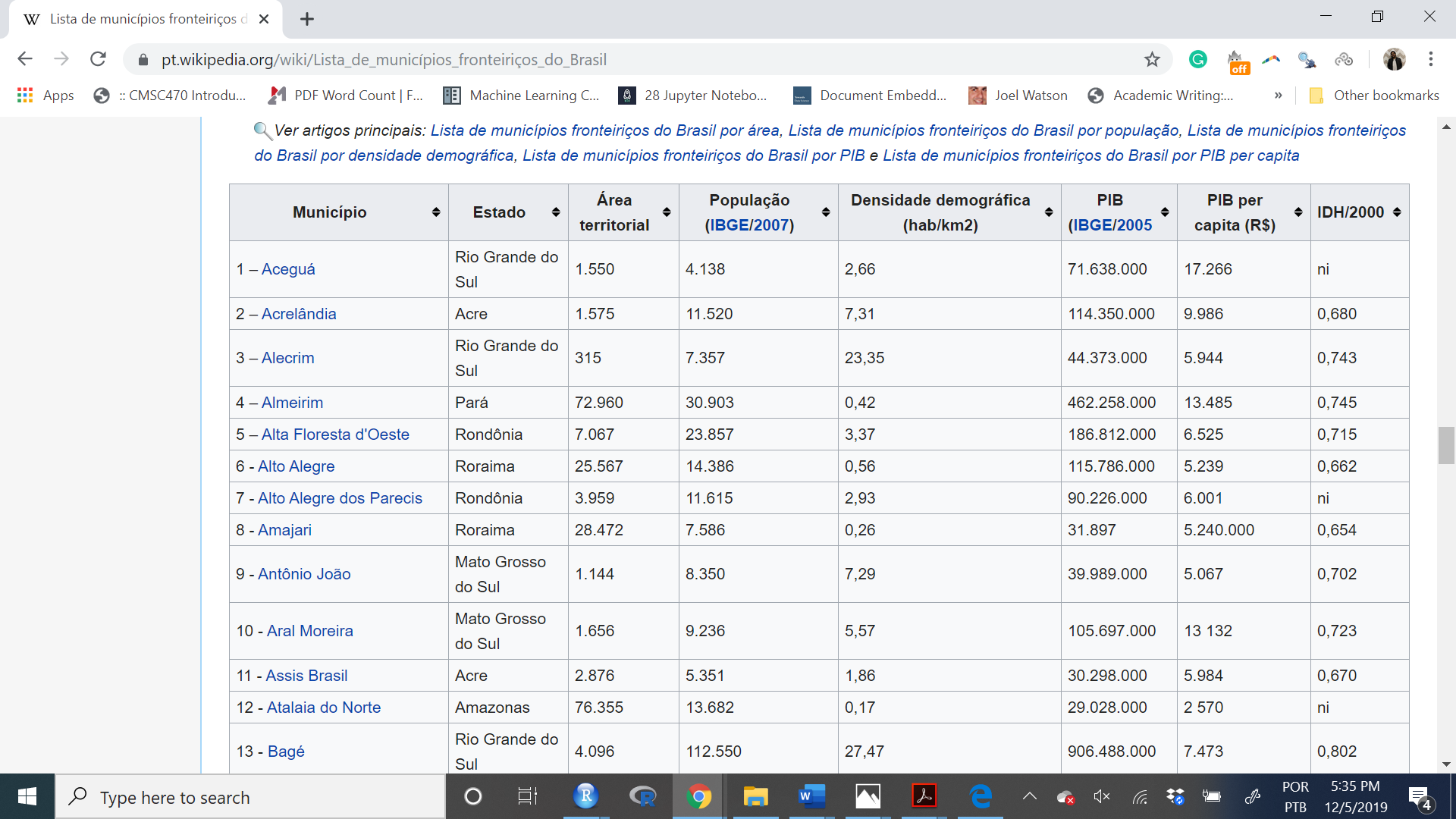 --- ## First Path: Get the Tags manually.  --- <br>  --- ### Let's capture this information using R ```r # Pacotes #install.packages("tidyverse") #install.packages("purrr") #install.packages("rvest") #install.packages("stringr") #install.packages("kableExtra") #install.packages("Rcurl") library(tidyverse) library(purrr) library(rvest) library(stringr) library(kableExtra) library(xml2) ``` --- #### Create a object with the name of the website. ```r minha_url <- "https://pt.wikipedia.org/wiki/Lista_de_munic%C3%ADpios_fronteiri%C3%A7os_do_Brasil" ``` #### Capture the html as a new object. ```r source <- read_html(minha_url) ``` #### Examine the object. ```r class(source) # XML=HTML ``` ``` [1] "xml_document" "xml_node" ``` --- ## html_table(): to extract the table tag. ```r tabelas <- source %>% html_table() ``` #### What is this object? ```r tabelas[[3]] ``` ``` Município Estado Área territorial 1 1 – Aceguá Rio Grande do Sul 1.550 2 2 – Acrelândia Acre 1.575 3 3 – Alecrim Rio Grande do Sul 315.000 4 4 – Almeirim Pará 72.960 5 5 – Alta Floresta d'Oeste Rondônia 7.067 6 6 - Alto Alegre Roraima 25.567 7 7 - Alto Alegre dos Parecis Rondônia 3.959 8 8 - Amajari Roraima 28.472 9 9 - Antônio João Mato Grosso do Sul 1.144 10 10 - Aral Moreira Mato Grosso do Sul 1.656 11 11 - Assis Brasil Acre 2.876 12 12 - Atalaia do Norte Amazonas 76.355 13 13 - Bagé Rio Grande do Sul 4.096 14 14 - Bandeirante Santa Catarina 146.000 15 15 - Barcelos Amazonas 122.476 16 16 - Barra do Quaraí Rio Grande do Sul 1.056 17 17 - Barracão Paraná 164.000 18 18 - Bela Vista Mato Grosso do Sul 4.896 19 19 - Belmonte Santa Catarina 94.000 20 20 - Benjamin Constant Amazonas 8.793 21 21 - Bom Jesus do Sul Paraná 174.000 22 22 - Bonfim Roraima 8.095 23 23 - Brasiléia Acre 4.336 24 24 - Cabixi Rondônia 1.314 25 25 - Cáceres Mato Grosso 24.398 26 26 - Capanema Paraná 419.000 27 27 - Capixaba Acre 1.713 28 28 - Caracaraí Roraima 47.411 29 29 - Caracol Mato Grosso do Sul 2.939 30 30 - Caroebe Roraima 12.066 31 31 - Chuí Rio Grande do Sul 203.000 32 32 - Comodoro Mato Grosso 21.743 33 33 - Coronel Sapucaia Mato Grosso do Sul 1.029 34 34 - Corumbá Mato Grosso do Sul 65.304 35 35 - Costa Marques Rondônia 12.722 36 36 - Crissiumal Rio Grande do Sul 362.000 37 37 - Cruzeiro do Sul Acre 7.925 38 38 - Derrubadas Rio Grande do Sul 361.000 39 39 - Dionísio Cerqueira Santa Catarina 378.000 40 40 - Dom Pedrito Rio Grande do Sul 5.192 41 41 - Doutor Maurício Cardoso Rio Grande do Sul 256.000 42 42 - Entre Rios do Oeste Paraná 122.000 43 43 - Epitaciolândia Acre 1.659 44 44 - Esperança do Sul Rio Grande do Sul 148.000 45 45 - Feijó Acre 24.202 46 46 - Foz do Iguaçu Paraná 618.000 47 47 - Garruchos Rio Grande do Sul 800.000 48 48 - Guaíra Paraná 561.000 49 49 - Guajará Amazonas 8.904 50 50 - Guajará Mirim Rondônia 24.856 51 51 - Guaraciaba Santa Catarina 331.000 52 52 - Herval Rio Grande do Sul 1.758 53 53 - Iracema Roraima 14.119 54 54 - Itaipulândia Paraná 336.000 55 55 - Itapiranga Santa Catarina 280.000 56 56 - Itaqui Rio Grande do Sul 3.404 57 57 - Jaguarão Rio Grande do Sul 2.054 58 58 - Japorã Mato Grosso do Sul 420.000 59 59 - Japurá Amazonas 55.791 60 60 - Jordão Acre 5.429 61 61 - Laranjal do Jari Amapá 30.966 62 62 - Mâncio Lima Acre 4.672 63 63 - Manoel Urbano Acre 9.387 64 64 - Marechal Rondon Paraná 748.000 65 65 - Marechal Thaumaturgo Acre 7.744 66 66 - Mercedes Paraná 201.000 67 67 - Mundo Novo Mato Grosso do Sul 479.000 68 68 - Normandia Roraima 6.967 69 69 - Novo Machado Rio Grande do Sul 219.000 70 70 - Nova Mamoré Rondônia 10.072 71 71 - Óbidos Pará 28.021 72 72 - Oiapoque Amapá 22.625 73 73 - Oriximiná Pará 107.603 74 74 - Pacaraima Roraima 8.028 75 75 - Paraíso Santa Catarina 179.000 76 76 - Paranhos Mato Grosso do Sul 1.302 77 77 - Pato Bragado Paraná 135.000 78 78 - Pedras Altas Rio Grande do Sul 1.377 79 79 - Pérola d'Oeste Paraná 206.000 80 80 - Pimenteiras do Oeste Rondônia 6.015 81 81 - Pirapó Rio Grande do Sul 292.000 82 82 - Plácido de Castro Acre 2.047 83 83 - Planalto Paraná 346.000 84 84 - Poconé Mato Grosso 17.261 85 85 - Ponta Porã Mato Grosso do Sul 5.329 86 86 - Porto Esperidião Mato Grosso 5.815 87 87 - Porto Lucena Rio Grande do Sul 250.000 88 88 - Porto Mauá Rio Grande do Sul 106.000 89 89 - Porto Murtinho Mato Grosso do Sul 17.735 90 90 - Porto Velho Rondônia 34.082 91 91 - Porto Vera Cruz Rio Grande do Sul 114.000 92 92 - Porto Walter Acre 6.136 93 93 - Porto Xavier Rio Grande do Sul 281.000 94 94 - Pranchita Paraná 226.000 95 95 - Princesa Santa Catarina 86.000 96 96 - Quaraí Rio Grande do Sul 3.148 97 97 - Rodrigues Alves Acre 3.305 98 98 - Roque Gonzales Rio Grande do Sul 347.000 99 99 - Santa Helena Paraná 758.000 100 100 - Santa Helena Santa Catarina 81.000 101 101 - Santa Isabel do Rio Negro Amazonas 62.846 102 102 - Santa Rosa do Purus Acre 5.981 103 103 - Santa Vitória do Palmar Rio Grande do Sul 5.244 104 104 - Santana do Livramento Rio Grande do Sul 6.950 105 105 - Santo Antônio do Içá Amazonas 12.308 106 106 - Santo Antônio do Sudoeste Paraná 326.000 107 107 - São Borja Rio Grande do Sul 3.616 108 108 - São Francisco do Guaporé Rondônia 4.747 109 109 - São Gabriel da Cachoeira Amazonas 109.185 110 110 - São José do Cedro Santa Catarina 280.000 111 111 - São Miguel do Iguaçu Paraná 851.000 112 112 - São Nicolau Rio Grande do Sul 485.000 113 113 - Sena Madureira Acre 25.278 114 114 - Serranópolis do Iguaçu Paraná 484.000 115 115 - Sete Quedas Mato Grosso do Sul 826.000 116 116 - Tabatinga Amazonas 3.225 117 117 - Tiradentes do Sul Rio Grande do Sul 234.000 118 118 - Tunápolis Santa Cataria 133.000 119 119 - Uiramutã Roraima 8.066 120 120 - Uruguaiana Rio Grande do Sul 5.716 121 121 - Vila Bela da Santíssima Trindade Mato Grosso 13.631 122 122 - Xapuri Acre 5.251 População (IBGE/2007) Densidade demográfica (hab/km2) PIB (IBGE/2005 1 4.138 2,66 71.638.000 2 11.520 7,31 114.350.000 3 7.357 23,35 44.373.000 4 30.903 0,42 462.258.000 5 23.857 3,37 186.812.000 6 14.386 0,56 115.786.000 7 11.615 2,93 90.226.000 8 7.586 0,26 31.897 9 8.350 7,29 39.989.000 10 9.236 5,57 105.697.000 11 5.351 1,86 30.298.000 12 13.682 0,17 29.028.000 13 112.550 27,47 906.488.000 14 3.028 20,73 21 423.000 15 24.567 0,20 72.004.000 16 3.776 3,57 61.540.000 17 9.027 55,04 60.601.000 18 22.868 4,67 132.870.000 19 2.681 28,52 21.670.000 20 9.268 3,32 82.120.000 21 3.835 22,04 17.950.000 22 10.231 1,26 68.363.000 23 19.065 4,39 117.525.000 24 6.575 5,00 77.125.000 25 84.175 3,45 596.654.000 26 18.103 43,20 180.519.000 27 8.446 4,93 78.389.000 28 17.981 0,37 100.885.000 29 5.095 1,73 45.533.000 30 7.086 0,58 42.296.000 31 5.278 26 67.525.000 32 17.939 0,82 169.919.000 33 13.979 13,58 54.797.000 34 114.279 1,74 1.557.253.000 35 13.664 1,07 63.022.000 36 14.726 40,67 114.089.000 37 73.948 9,33 391.943.000 38 3.378 9,35 22.816.000 39 14.792 39,13 91.757.000 40 38.148 7,34 399.884.000 41 5.494 21,46 44.112.000 42 3.842 31,49 43.185.000 43 13.434 8,59 88.164.000 44 3.445 23,27 22.399.000 45 31.288 1,29 144.977.000 46 311.336 503,7 4.853.331.000 47 3.457 4,32 142.976.000 48 28.683 51,12 262.157.000 49 14.102 1,58 36.564.000 50 39.451 1,58 345.511.000 51 10.604 32,03 103.642.000 52 6.873 3,90 46.229.000 53 5.863 0,41 46.735.000 54 8.581 25,53 83.158.000 55 15.238 54,42 298.682.000 56 36.361 10,68 487.062.000 57 27.944 13,60 193.018.000 58 7.362 17,52 23.976.000 59 5.281 0,09 27.100.000 60 6.059 1,11 23.805.000 61 37.491 1,21 182.901.000 62 13.785 2,95 49.705.000 63 7.148 0,76 31.268.000 64 44.562 59,57 632.818.000 65 13.061 1,68 37.645.000 66 4.713 23,44 54.480.000 67 15.968 33,33 98.247.000 68 7.118 1,02 51.071.000 69 4.246 19,38 25.210.000 70 21.162 2,10 124.538.000 71 46.793 1,66 138.489.000 72 19.181 0,84 143.244.000 73 55.175 0,51 776.845.000 74 8.640 0,10 60.608.000 75 4.195 23,43 33.605.000 76 11.092 8,51 43.703.000 77 4.631 34,30 41.697.000 78 2.546 1,84 27.829.000 79 7.046 34,20 45.781.000 80 2.358 0,39 37.163.000 81 2.988 10,23 17.960.000 82 17.258 8,43 139.814.000 83 13.649 39,44 86.426.000 84 31.118 1,80 155.511.000 85 72.207 13,54 500.246.000 86 9.607 1,65 75.694.000 87 5.631 22,52 34.801.000 88 2.565 24,19 18.496.000 89 14.861 0,83 128.574.000 90 369.345 10,83 3.656.512.000 91 2.084 18,28 14.178.000 92 8.170 1,33 25.925.000 93 10.857 38,63 71.337.000 94 5.811 25,71 57.331.000 95 2.604 30,27 18.803.000 96 22.552 7,16 162.412.000 97 12.428 3,76 51.468.000 98 7.297 21,02 54.655.000 99 22.794 30,07 219.973.000 100 2.437 30,08 165.449.000 101 16.921 0,26 24.231.000 102 3.948 0,66 15.321.000 103 31.183 5,94 289.223.000 104 83.479 12,01 598.387.000 105 29.249 2,37 68.275.000 106 18.565 56,94 92.521.000 107 65.671 17,10 596.804.000 108 15.710 3,30 108.183.000 109 39.129 0,35 111.093.000 110 13.699 48,92 153.722.000 111 25.341 29,77 297.300.000 112 5.909 12,18 32.338.000 113 34.230 1,35 234.381.000 114 4.327 8,94 52.876.000 115 10.659 12,90 54.103.000 116 45.293 14,04 116.755.000 117 6.928 29,6 42.926.000 118 4.650 34,96 40.845.000 119 7.403 0,91 27.251.000 120 123.743 21,64 1.187.038.000 121 13.886 1,01 116.908.000 122 14.314 2,72 82.377.000 PIB per capita (R$) IDH/2000 1 17.266 ni 2 9.986 0,680 3 5.944 0,743 4 13.485 0,745 5 6.525 0,715 6 5.239 0,662 7 6.001 ni 8 5.240.000 0,654 9 5.067 0,702 10 13 132 0,723 11 5.984 0,670 12 2 570 ni 13 7.473 0,802 14 7 546 0,765 15 2.238 ni 16 14 429 0,777 17 6.718 0,764 18 5.676 0,755 19 9.954 0,759 20 3.135 ni 21 4.638 0,696 22 5. 414 0,654 23 6.632 0,669 24 10.372 0,705 25 6.700 0,737 26 10.297 0,803 27 11.092 0,607 28 5.685 0,702 29 9.094 0,725 30 7.207 0,661 31 10.574 0,811 32 9.010 0,724 33 4.041 0,713 34 13.234 0,771 35 5.553 ni 36 8.376 0,786 37 4.647 0,668 38 7.046 0,759 39 6.293 0,747 40 9.547 0,783 41 7.635 0,765 42 12.063 0,847 43 6.397 0,684 44 6.753 0,708 45 3.791 0,541 46 16 102 0,802 47 35.798 0,715 48 9.424 0,777 49 3.030 ni 50 8.332 0,740 51 10.111 ni 52 6.151 0,754 53 7. 712 0,713 54 9.782 0,760 55 22.447 0,832 56 11.494 0,801 57 6.116 0,764 58 3.350 0,636 59 2.080 ni 60 5.138 0,475 61 5.099 ni 62 3.899 0,642 63 4.095 0,601 64 14 155 0,829 65 4.452 0,533 66 11.210 0,816 67 6.884 0,761 68 9.573 0,600 69 5.922 0,773 70 6.388 ni 71 2 820 0,681 72 8.828 ni 73 14.620 0,717 74 7.378 0,718 75 8.312 0,773 76 4.094 0,676 77 9.542 0,821 78 10.135 ni 79 6.961 0,759 80 14 201 0,715 81 5.879 0,720 82 8.377 0,683 83 6.395 0,763 84 4.961 0,679 85 7.445 0,780 86 6 958 0,695 87 5 845 0,747 88 6 833 0,802 89 9 430 0,698 90 9.779 0,763 91 6.378 0,755 92 5.225 0,540 93 6.285 0,762 94 10.120 0,803 95 7.709 ni 96 6 444 0,776 97 5.254 0,550 98 7.626 0,749 99 10.226 0,799 100 14.812 0,787 101 3.181 ni 102 4.513 0,525 103 8.360 0,799 104 6 138 0,803 105 1.958 ni 106 5.101 0,715 107 8 862 0,798 108 6 453 ni 109 3.261 0,567 110 11.838 0,804 111 11.065 0,779 112 5.290 0,713 113 7 105 0,652 114 10.635 0,796 115 6.445 0,719 116 2.655 ni 117 6.577 0,746 118 9.420 0,821 119 4.238 0,542 120 8.798 0,788 121 8.047 0,715 122 6.016 0,669 ``` --- ### Clean ans save our first output. ```r tabela_limpa <- tabelas[[3]] %>% # make it a tibble as.tibble() %>% # new variables mutate(city = Município, uf_name = Estado) %>% select(city, uf_name) %>% # fix enconding mutate(city = str_sub(city,5), city = str_replace(city, pattern="- ", ""), city = str_trim(city), city_key = stringi::stri_trans_general(city, "Latin-ASCII"), city_key= str_replace_all(city_key, " ", ""), city_key=str_to_lower(city_key)) tabela_limpa ``` ``` # A tibble: 122 x 3 city uf_name city_key <chr> <chr> <chr> 1 Aceguá Rio Grande do Sul acegua 2 Acrelândia Acre acrelandia 3 Alecrim Rio Grande do Sul alecrim 4 Almeirim Pará almeirim 5 Alta Floresta d'Oeste Rondônia altaflorestad'oeste 6 Alto Alegre Roraima altoalegre 7 Alto Alegre dos Parecis Rondônia altoalegredosparecis 8 Amajari Roraima amajari 9 Antônio João Mato Grosso do Sul antoniojoao 10 Aral Moreira Mato Grosso do Sul aralmoreira # … with 112 more rows ``` --- # Path 2: Scrapping using CSS Selection. Scraping data from tables is an easy task. Everything gets more complicated when websites have more complex structures, and we need to use HTML tags (called CSS). For this, we will use the CSS Selector Gadget. In this example, I will access the private page of each of the 71 deputies of the Legislative Assembly of the State of Rio de Janeiro. Let's go: - Name - Email - Biography - Political Party --- ### An example with CSS Selector.  --- ### Steps using the CSS Selector. - Enable CSS on your browser, - Click on the information you want to extract -> Yellow. - A second click if you are capturing more than you need. - Repeat this until you isolate your target of interest. - Copy and paste the result into the `html_nodes()` function --- ### Extracting the names (`html_text`) ```r # Capture the names minha_url <- "http://www.alerj.rj.gov.br/Deputados/QuemSao" nomes <- read_html(minha_url) %>% html_nodes(css=".nome a") %>% * html_text() # Clean the names nomes_limpos <- nomes %>% str_to_title() nomes_limpos ``` ``` [1] "Adriana Balthazar" "Alana Passos" [3] "Alexandre Freitas" "Alexandre Knoploch" [5] "Anderson Alexandre" "Anderson Moraes " [7] "André Ceciliano" "Andre Correa" [9] "Atila Nunes" "Bebeto" [11] "Brazão" "Bruno Dauaire" [13] "Carlos Macedo" "Carlos Minc" [15] "Celia Jordão" "Charlles Batista " [17] "Chico Machado" "Chiquinho Da Mangueira" [19] "Coronel Jairo" "Coronel Salema" [21] "Dani Monteiro" "Danniel Librelon" [23] "Delegado Carlos Augusto" "Dionisio Lins" [25] "Dr. Deodalto" "Eliomar Coelho" [27] "Enfermeira Rejane" "Eurico Junior" [29] "Fábio Silva" "Filipe Soares" [31] "Filippe Poubel" "Flavio Serafini" [33] "Franciane Motta" "Giovani Ratinho" [35] "Gustavo Schmidt " "Jair Bittencourt" [37] "Jalmir Junior" "Jorge Felippe Neto" [39] "Lucinha" "Luiz Martins" [41] "Luiz Paulo" "Marcelo Cabeleireiro" [43] "Marcelo Dino" "Márcio Canella" [45] "Márcio Gualberto " "Márcio Pacheco" [47] "Marcos Abrahão" "Marcos Muller" [49] "Marcus Vinicius" "Martha Rocha" [51] "Mônica Francisco" "Noel De Carvalho" [53] "Pedro Ricardo" "Renata Souza" [55] "Renato Zaca" "Rodrigo Amorim" [57] "Ronaldo Anquieta" "Rosane Felix" [59] "Rosenverg Reis" "Rubens Bomtempo" [61] "Samuel Malafaia" "Sergio Fernandes" [63] "Sub Tenente Bernardo" "Tia Ju" [65] "Val Ceasa" "Valdecy Da Saúde" [67] "Vandro Familia" "Waldeck Carneiro" [69] "Wellington José" "Zeidan" ``` --- ### Capturing the links. (`html_attr`) ```r links <- read_html(minha_url) %>% html_nodes(css=".nome a") %>% * html_attr("href") # Combine the links. links <- paste0("http://www.alerj.rj.gov.br/", links) # Build a dataset dados <- tibble(nomes=nomes, links=links) ``` --- ### Scrapping one case (master this first) ```r # url link <- dados$links[[1]] #source source <- link %>% read_html() # Information nome <- source %>% html_nodes(css=".paginacao_deputados .titulo") %>% html_text() %>% str_remove_all(., "\\r|\\n") %>% str_trim() %>% str_squish() partido <- source %>% html_nodes(css=".partido") %>% html_text() biografia <- source %>% html_nodes(css=".margintop11") %>% html_text() %>% paste0(., collapse = " ") telefone <- source %>% html_nodes(css=".margin_bottom_5+ p") %>% html_text() email <- source %>% html_nodes(css="#formVisualizarPerfilDeputado p+ p") %>% html_text() # Combine all the relevant information. deputados <- tibble(nome, link, partido, biografia, telefone, email) ``` --- ```r deputados ``` ``` # A tibble: 1 x 6 nome link partido biografia telefone email <chr> <chr> <chr> <chr> <chr> <chr> 1 DEPUTADO… http://www.alerj… Novo No… "\r\nAdriana Balthaz… (21) 258… adrianab… ``` -- #### And now? -- We have now finished our first step. We need to expand this to all deputies. - Convert our code to a function. - Apply the function to a list of links (Functional programming) - Great that we learned more about functions yesterday! -- --- ### Functional Programming and Data Scraping. In the previous code, we created a snippet of code to scrape data for one case. However, our goal is to scrape data for millions of cases, and let our computer do the work while we think about other things. For this task, we should use the skills we learned on **functional programming** --- ## What is functional programming? The fundamental idea of functional programming is to prepare all your code in terms of distinct functions. And apply this function to similar cases. **Data Scraping**: write a function that allows us to repeat what we did for a case for the other pages we intend to scrape. With this function written, we only have to apply it to multiple elements. We do this using the map functions from `purrr` --- ### Writing your master function (for one case) ```r raspar_alerj <- function(url){ source <- url %>% read_html() # informacao nome <- source %>% html_nodes(css=".paginacao_deputados .titulo") %>% html_text() %>% str_remove_all(., "\\r|\\n") %>% str_trim() %>% str_squish() partido <- source %>% html_nodes(css=".partido") %>% html_text() biografia <- source %>% html_nodes(css=".margintop11") %>% html_text() %>% paste0(., collapse = " ") telefone <- source %>% html_nodes(css=".margin_bottom_5+ p") %>% html_text() %>% paste0(., collapse = " ") email <- source %>% html_nodes(css="#formVisualizarPerfilDeputado p+ p") %>% html_text() %>% paste0(., collapse = " ") # Combina tudo como um banco de dados deputados <- tibble(nome, link, partido, biografia, telefone, email) # Output return(deputados) # Putting your R to sleep a bit. Sys.sleep(sample(1:3, 1)) } ``` --- ### Apply to one case ```r raspar_alerj(dados$links[[5]]) # does it work? ``` ``` # A tibble: 1 x 6 nome link partido biografia telefone email <chr> <chr> <chr> <chr> <chr> <chr> 1 DEPUTAD… http://www.al… SDD SDD -… Anderson Alexandre… (21) 25… andersonalexa… ``` --- ### Purrr and Data Scraping. Now we have the two missing pieces to finish our tutorial: 1. One function designed to scrape our cases, and 2. A way to automate this journey from case to case (purrr). Let's implement it now. ```r # convert all the cases to a list lista_links <- as.list(dados$links[1:10]) # apply our function to the list of links/ dados <- map(lista_links, raspar_alerj) # bind all the cases as a new data frame dados_alerj <- bind_rows(dados) ``` --- ### Result ```r dados_alerj ``` ``` # A tibble: 10 x 6 nome link partido biografia telefone email <chr> <chr> <chr> <chr> <chr> <chr> 1 DEPUTAD… http://www.a… "Novo Novo" "\r\nAdriana Ba… "(21) 2588… "adrianabal… 2 DEPUTAD… http://www.a… "PSL PSL - … "Alana de Olive… "(21) 2588… "alanapasso… 3 DEPUTAD… http://www.a… "Novo Novo" "Advogado, Alex… "(21) 2588… "alexandref… 4 DEPUTAD… http://www.a… "PSL PSL - … " Alexandre Go… "(21) 2588… "alexandrek… 5 DEPUTAD… http://www.a… "SDD SDD - … "Anderson Alexa… "(21) 2588… "andersonal… 6 DEPUTAD… http://www.a… "PSL PSL - … "Anderson Morae… "(21) 2588… "andersonmo… 7 DEPUTAD… http://www.a… "PT PT - Pa… "Cidadão da Bai… " 28 de fe… "\r\n … 8 DEPUTAD… http://www.a… "DEM DEM" "André Corrêa n… " 2 de jan… "\r\n … 9 DEPUTAD… http://www.a… "MDB MDB - … "É carioca, adv… " 14 de de… "\r\n … 10 DEPUTAD… http://www.a… "PODE Podem… "Nome completo:… " 16 de fe… "\r\n … ``` --- class: center, middle  --- ### Saving ```r write.csv(dados_alerj, "deputados_alerj.csv") ``` --- ### More, and more I have a bunch of codes scrapping on-line data. And you can find a lot of different tutorials on-line. If you want more codes to practice, let me know. I am happy to email you with a few examples. --- ### Homework. I actually prepared a homework for you this afternoon. Hope you have fun. Instructions: In this exercise, you will create a complete scraping program in R. Our objective is to collect all the information from the [agenda](https://www.gov.br/planalto/pt-br/acompanhe-o-planalto/agenda-do-president-da-republica/2020-01 -01) of President Bolsonaro in the year 2020 and 2021. You need: 1. Write code to gather information. 2. Capture the information and store it in a data frame. 3. This data frame must have the following columns: day, time, meeting description. 4. Print a summary of the data frame at the end of the code, using the glimpse.